
How I Do Pinterest Keyword Research in 2026 (Under 10 Minutes Per Pin)
What to look for. What to skip. The way I run keyword research now.

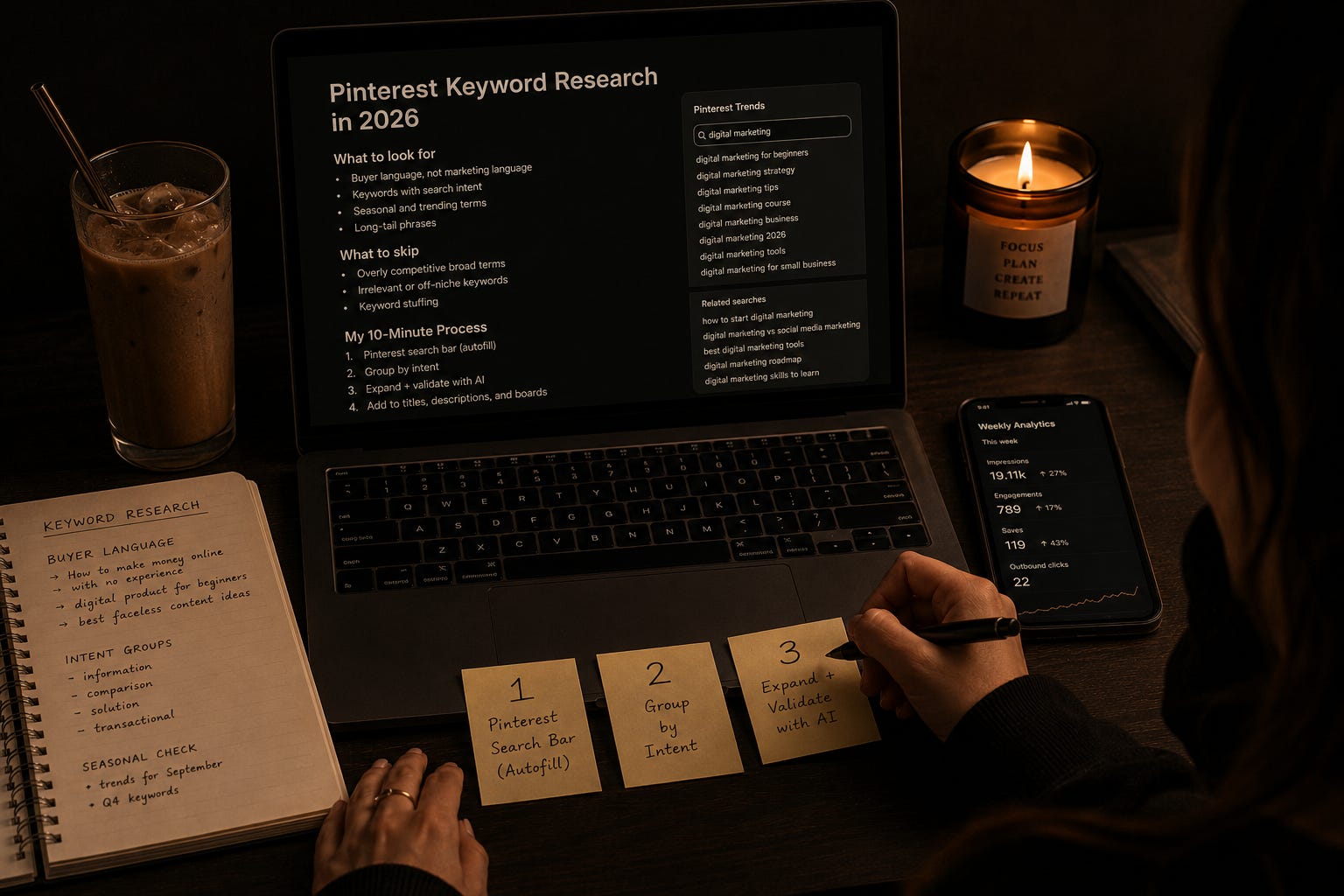
Keyword research on Pinterest is a battle for most creators.
They write a bunch of titles. They write a bunch of descriptions.
Nothing lands. Pins get buried in the algorithm.
So they blame Pinterest. Say it isn’t working. Move to Instagram or somewhere louder.
Nothing works on Pinterest unless the pin hits the exact things the algorithm is looking for. Keywords are a big part of that.
And most creators get it wrong not because they are lazy. Because the way keyword research usually gets taught is broken.
That was me too. I wrote pins the way the guides said to write them.
Nothing moved for months.
Now I am strategic about it. Different questions. Different tools. Different pattern.
I was pulling real traffic from Pinterest and made my first sale before I even had my own product to sell.
Let me show you how but before that… take a moment to subscribe below…..
Pinterest dips. That is the platform, not you.
Real quick before we go in. Pinterest engagement rises and falls seasonally.
If yours feels slower right now, that is the platform, not you.
But that is also not the reason your keywords are not landing.
This is. Now let’s get into it;
Pinterest is a search engine that looks like a social feed.
Here is the thing most Pinterest content skips.
Pinterest is not a social platform. It is a search engine.
Every pin the algorithm decides to show is picked because it matches what someone is searching for right now.
Not what looks nice. Not what is clever. What matches the exact language a buyer types when they are looking for the thing you are offering.
So the whole game is language matching.
Most creators write titles and descriptions in marketing language.
Polished. Professional. The way a brand would speak. Buyers do not type in marketing language.
They type the messy, half-formed version of what they need. “How to make money online with no experience.” Not “digital entrepreneurship strategies for beginners.”
Same idea. Different words. One gets seen every hour. The other never surfaces.
The single biggest shift for me was writing pins in buyer language, not in marketing language.
That meant actually going to the Pinterest search bar and reading what the autofill suggests.
What real people are typing. In their own words. The autofill is Pinterest handing you the winning keywords for free, and most skip past it every single day.
Before you write your next pin title, open Pinterest. Start typing the topic of your pin. Watch what autofill gives you.
That is your buyer, talking to Pinterest, in front of you. Steal their phrasing.
AI does the volume work. You keep the judgment.
Here is where the math changes.
Doing keyword research per pin from scratch is not a good idea.
It takes twenty to thirty minutes to find good keywords, sort them, and write a title and description that actually match how buyers search.
Multiply that by twenty pins a week …. and you are burning eight to ten hours on keyword work alone. Nobody has that.
AI cuts that to minutes.
I use Claude for this. I do the buyer-language legwork once.
I collect the autofill terms, the language patterns, the intent groupings.
Then I sit down with Claude and expand it.
What might a first-time buyer type. What would a ready-to-buy audience type. What are the phrasings that show up in September that were not there in June.
Claude generates the volume. I keep the judgment. A morning of work instead of a weekend.
That distinction matters. The point is not that AI does the thinking for you.
The point is that AI does the heavy volume work while you keep the taste, the honesty, the filter for what actually fits your audience.
You still decide what is real. You still cut the marketing-brain phrasings. Y
ou just stop starting from a blank page every single time you sit down to write.
This is what made Pinterest keyword research sustainable for me. Not once.
Every month. Because Pinterest shifts constantly. Search terms move with the season, the trend, the news cycle.
Staying ahead of that shift is only possible with a constant back and forth.
AI is what makes constant back and forth actually possible on two hours a day.
If you want to go deeper on Pinterest……
If you want the full Pinterest playbook, the deeper workflow I run every week is inside The Copy-Paste Pinterest System.
Everything about how Pinterest actually rewards pins. How to structure a whole account around buyer language, not marketing language.
This article shows you the shift. The System is where the depth lives.
Grab it below…
Here is what this week looks like on my Pinterest.
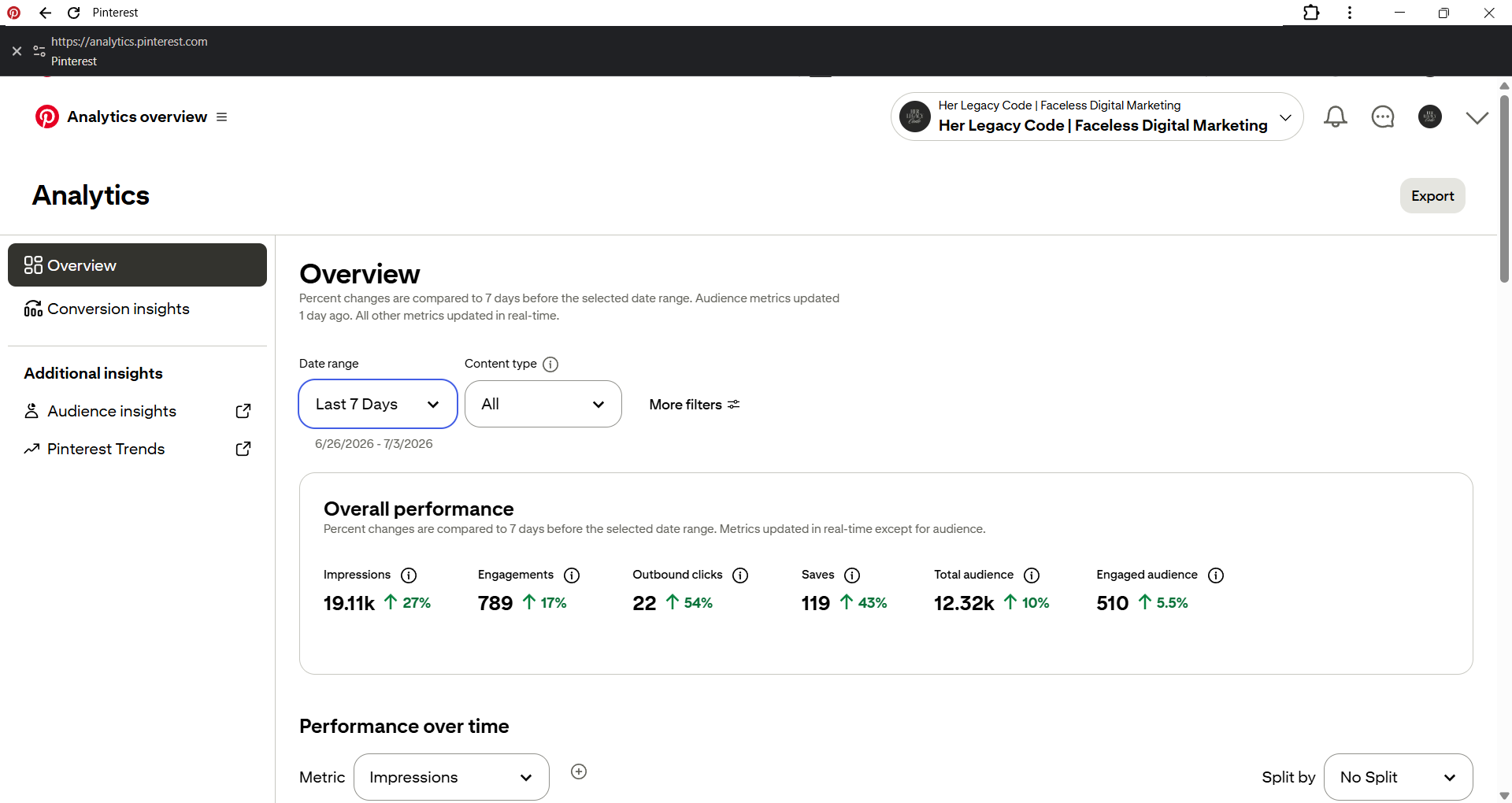
19.11k impressions, up 27% on last week. 789 engagements, up 17%.
119 saves, up 43%. Outbound clicks are 22, and I am not going to dress that up.
Clicks are a separate lever from keywords entirely.
Pin design carries more of that weight. That is a different article.
What keyword work moves is the impressions number. It is what puts your pins in front of the right buyer at the right moment.
Everything downstream, the clicks, the saves, the sales, the traffic to your offer, depends on that first step actually working.
And the first sale I made from Pinterest happened before I had my own product to sell. That is not a flex. That is the point.
When the keywords are right, traffic finds you before you are even ready for it.
Which is exactly why I want you doing this now, not after you launch.
Before you close this tab
If Pinterest analysis and the real version of what actually grows a faceless account is what you want in your inbox every week, that is what DECODED does. I share the numbers, the working method, and the part that did not work first.
Subscribe below to not miss zany breakdown...
Share your thoughts in the comment below!
I read every comment. Always.
P.S. If you have not started yet, Pinterest From Zero is the free head start.
It is the map for the stretch I got lost in for months. Grab it here…
Something that made AI keyword research actually useful for me rather than just faster was building what I call an intent layer before I prompt anything. I go into Pinterest autofill and sort what I find into three buckets: people just discovering a problem, people comparing solutions, and people ready to act, because those three groups need completely different pin titles even if the underlying topic is identical. Once I have those buckets, I feed them into Claude with context about the season and the offer type, and the output is much closer to ready-to-use than when I just dump a topic in and ask for keywords. The approach Amy describes here of doing the legwork once and then expanding with AI is exactly right; the mistake is skipping the legwork and expecting AI to do the discovery part too because it cannot see what is trending in the autofill right now. For digital product creators especially, affiliate pins and product pins need totally different keyword angles because the buyer intent signals are different, and that distinction is worth building into your workflow from the start rather than treating all pins the same.