
The Lazy-Girl Pinterest Batching System That Actually Saves Me 5+ Hours Every Week
How I use Canva to batch pins, stay consistent, and drive traffic without daily effort


Hello everyone, and happy new year to all of you!
Can we talk about the Sunday night dread for a second?
You know that feeling when you’ve survived your 9-5, you’re finally home, and all you want to do is absolutely nothing...
but there’s this nagging voice reminding you that you need to create Pinterest pins for the week?
Yeah. That was my life every single Sunday.
I’d drag myself to Canva around 9 PM, brain completely fried, forcing myself to design “just a few pins” while internally screaming because I should be engaging on Substack, reading other creators’ work, or—wild concept actually relaxing like a normal human.
But if I didn’t show up? My Pinterest would go silent.
Traffic would drop. My entire faceless business strategy would crumble.
So I kept grinding, exhausted and resentful, until one day in late December I thought: What if I just... stopped doing this every single week?
What if I batch created an entire month’s worth of pins in one sitting at the end of every month instead?
At first, the idea felt massive.
A whole month? That’s 30+ pins minimum.
Wouldn’t that take forever?
But then I realized: four free weekends versus four Sundays chained to Canva?
More time to engage on Substack, build real connections, and actually breathe without Pinterest guilt following me everywhere?
Yeah. Monthly batching became my new year resolution.
And I just finished my first full monthly batch session this week, and honestly?
Even though I’m still figuring out the flow and it took longer than I expected, I already feel different knowing I don’t have to touch Pinterest again for weeks.
That mental shift alone is worth it.
Why Monthly Batching Makes Sense (Especially With a 9-5)
Here’s the thing about weekly batching: it’s better than creating pins daily, sure.
But it still means every single Sunday is spoken for.
Every weekend, there’s this task hanging over you. You can’t fully disconnect. You can’t make spontaneous plans. You definitely can’t take a Sunday off without scrambling to catch up.
When you batch monthly, you flip that completely.
One focused session (yes, it’s longer—let’s be honest), and then you’re done for 30 days.
Four weekends free. Four Sundays to actually live.
More importantly? You’re not making creative decisions when you’re exhausted.
When you batch monthly, you do it when your energy is high and you can think strategically about what content will actually perform.
And if you’re building a solo faceless business?
This system is perfect because your content isn’t tied to trends or breaking news. You’re solving evergreen problems that don’t expire tomorrow.
The Tools You Actually Need (It’s Simpler Than You Think)
Let’s talk about what you need to make this work without overcomplicating it:
Canva Pro – Non-negotiable. You need the bulk create feature that connects with spreadsheets. This is the game-changer that makes monthly batching possible.
ChatGPT (or Canva’s Magic Write) – For generating scroll-stopping headlines and subheadlines in bulk. I’ll show you exactly how in a second.
5-6 ready-made Pinterest templates – You don’t want all your pins looking identical. Multiple designs keep your feed visually interesting and test what resonates.
Pinterest’s native scheduler – Honestly, you don’t need to pay for Tailwind or other platforms.
Pinterest lets you schedule up to 30 pins, which perfectly covers a month of content.
That’s it. No fancy systems. No expensive tools beyond Canva Pro.
And if you’re just starting and feeling overwhelmed by even setting up your Pinterest profile correctly,
I created a free Faceless Digital Marketing Blueprint that walks you through the foundation—profile setup, board strategy, your first pins.
Grab it so you’re building on solid ground from day one.
My Exact Monthly Batching Process (Behind-the-Scenes)
Alright, here’s exactly how I do this just the actual steps.
Step 1: Content Planning (30 minutes)
At the end of every month, I map out content for the next 30 days.
I look at:
Articles I’m publishing on Substack
Products or freebies I’m promoting
Questions my audience keeps asking
What performed well last month
Then I create a list of 20-30 pin topics. Not full descriptions yet just ideas.
Step 2: Turning Ideas Into Headlines Using AI (20 minutes)
Here’s where it gets fast.
Option 1: ChatGPT
I drop my basic ideas into ChatGPT with this prompt:
“Turn these Pinterest pin ideas into scroll-stopping, curiosity-driven headlines under 60 characters. Make them emotional and benefit-focused. Format as a list I can copy into a spreadsheet.”
Boom. 30 polished headlines in seconds.
Option 2: Canva’s Magic Write
Even easier—you can input one headline into Canva and use the Magic Write option to generate similar variations.
Just type your first headline, hit Magic Write, and ask it to “create 10 similar Pinterest headlines with clear CTAs.”
Boom. Ready-made headlines you can use directly in your bulk create process.
Both work. Pick what fits your flow.
Step 3: The Canva Sheets Magic (This Is Where It Gets Easy)
This is the part that changed everything for me.
Canva has a feature called Bulk Create that connects to spreadsheets and automatically generates pins.
Here’s how:
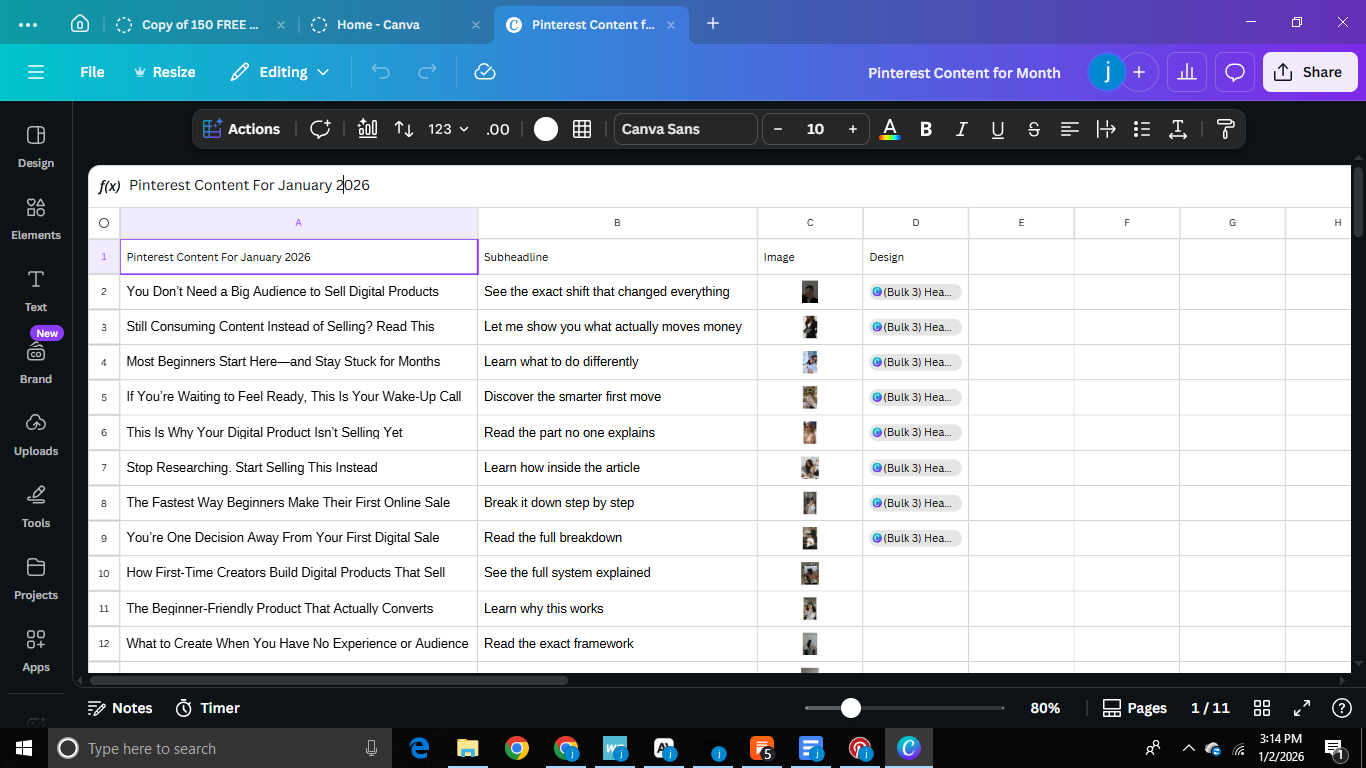
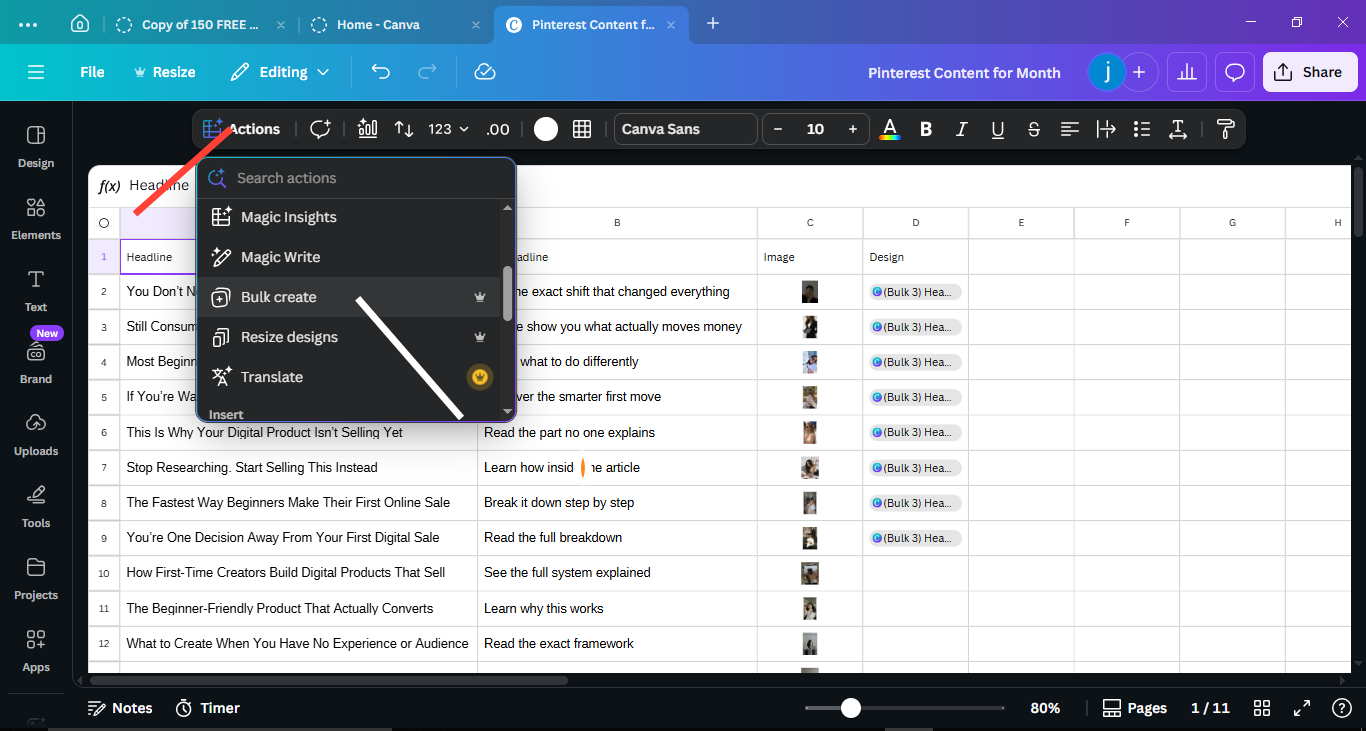
Create a spreadsheet with columns: Headline, Subheadline, Image (optional).
see an example of mine below↓
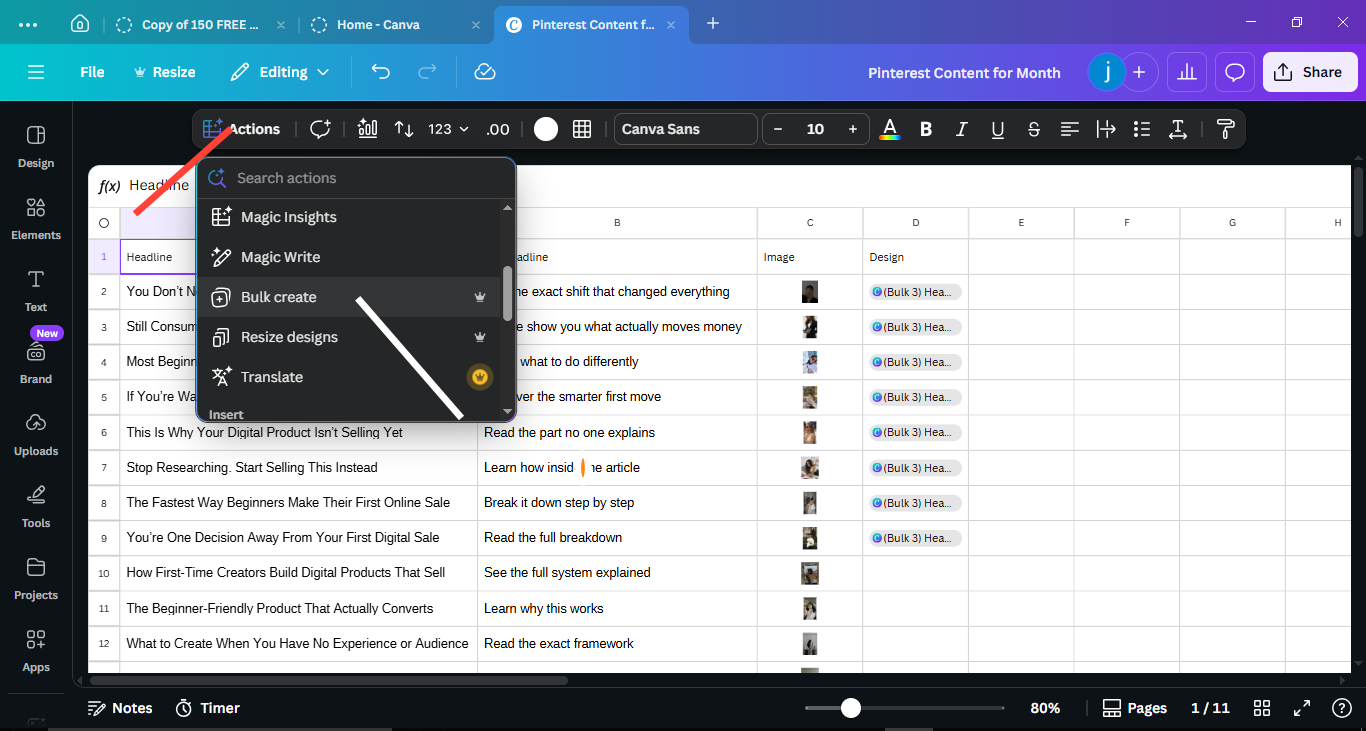
In Canva, open your template and go to Apps → Bulk Create.↓
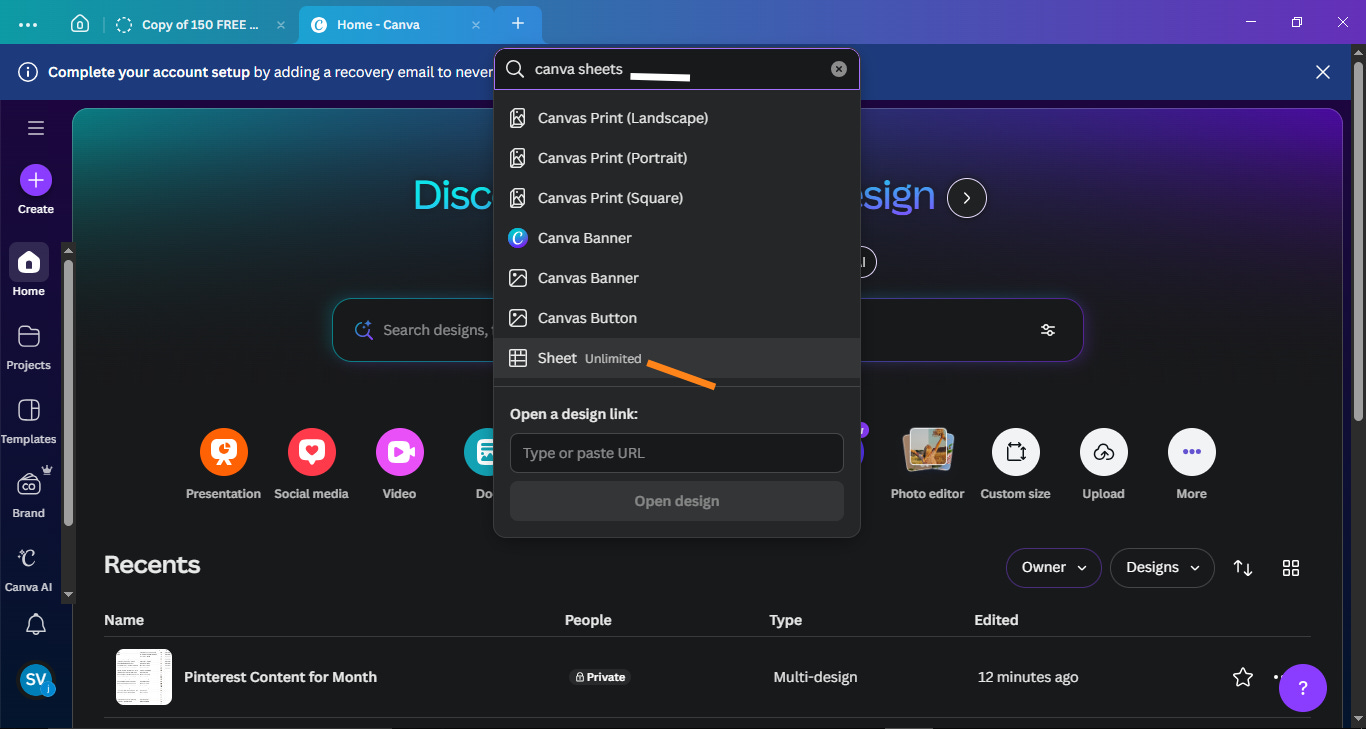
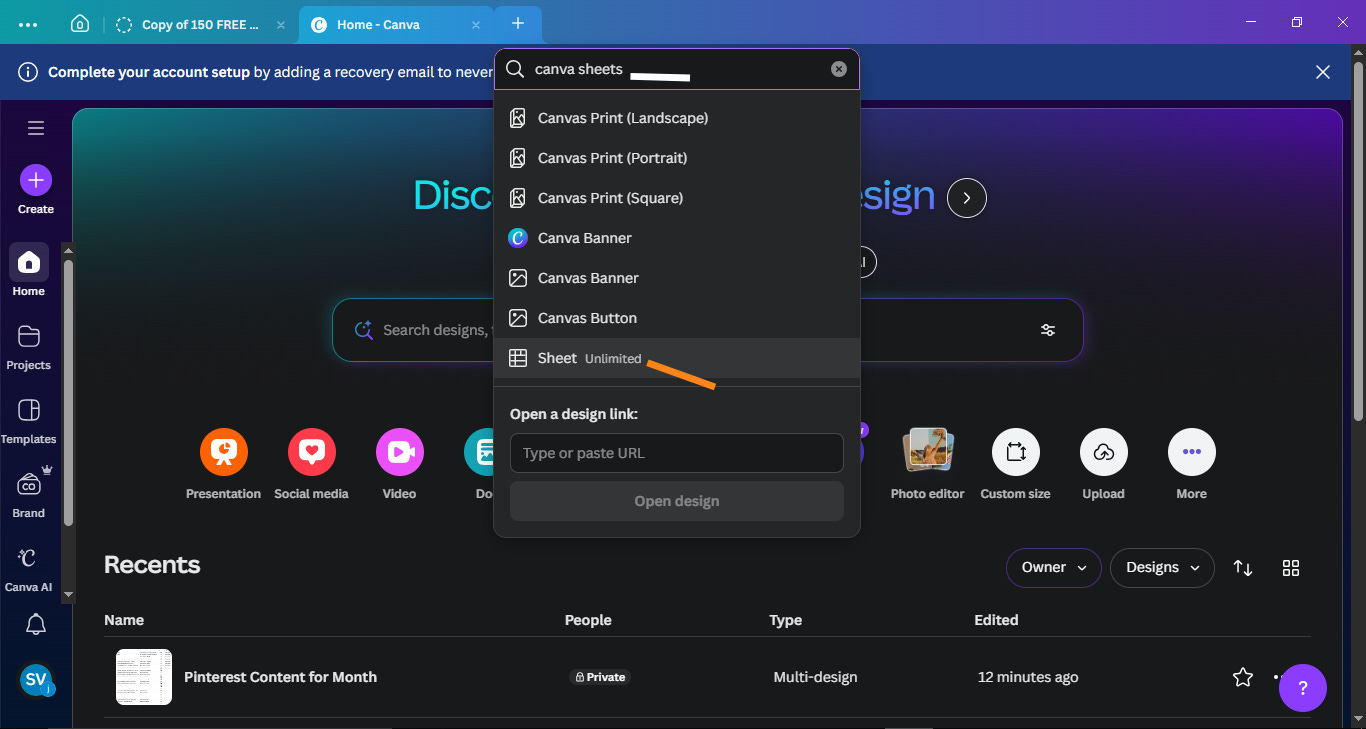
Type in Canva sheets as below↓
Canva generates a unique pin for every row, rotating through your 5-6 template designs.
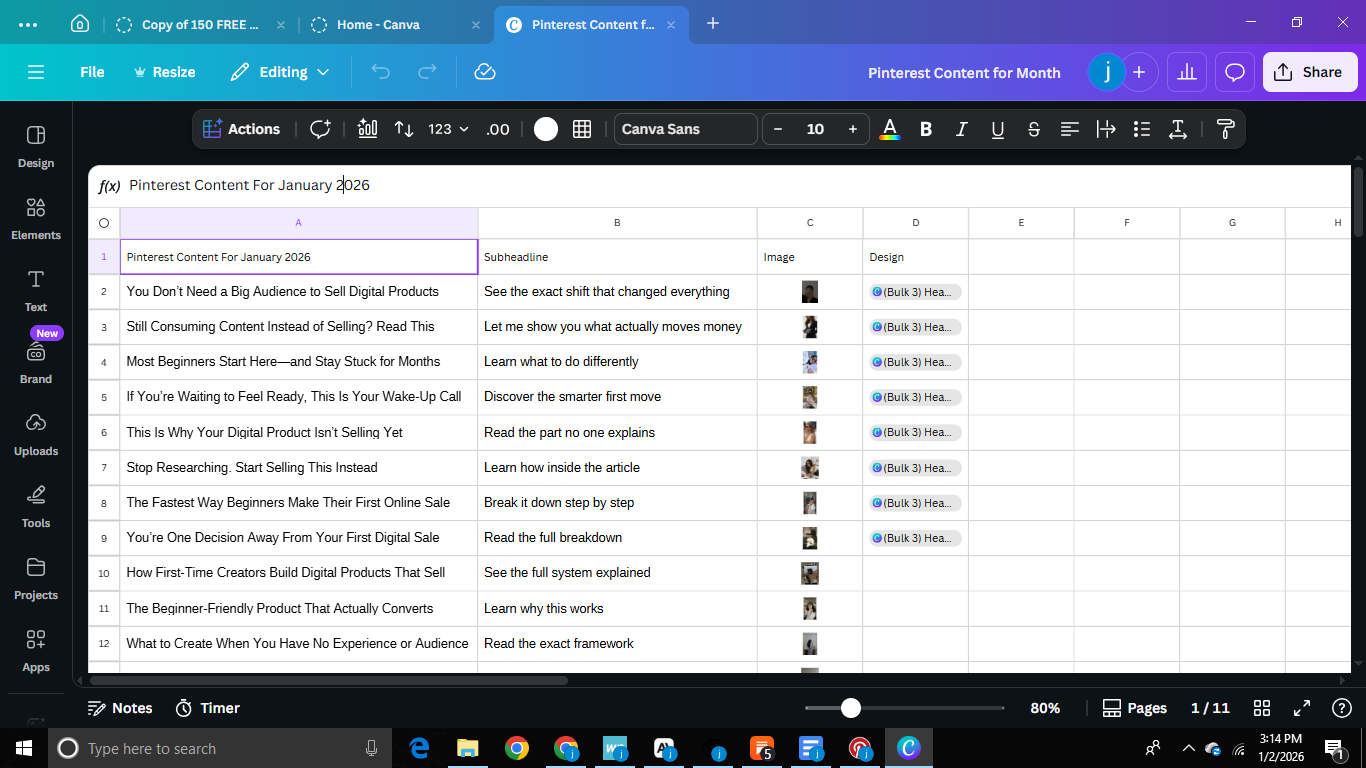
So instead of manually creating 30 pins one by one, you set it up once and Canva does the work.
You can even upload images in bulk, so you only tweak minor details after.
Note: You need Canva Pro and 5-6 different templates ready so your pins don’t all look the same.
If this sounds confusing, I learned this exact process from this YouTube video ↓
Seriously—watch it. It breaks down every click.
Honestly, this step takes about 1.5 hours once you’re used to it.
First time? Expect 3+ hours. It’s a learning curve, but worth it.
Step 4: SEO Optimization and Scheduling (30 minutes)
After Canva generates your pins, download them all.
Then take your headlines and drop them into ChatGPT with this prompt:
“Turn these Pinterest pin headlines into SEO-optimized titles and descriptions. Include relevant keywords and make them compelling for clicks.”
Copy-paste the results into Pinterest’s native scheduler.
I personally publish 2 pins daily you can do 1 if you prefer, but 2 keeps momentum strong.
Pinterest lets you schedule 30 pins at once, which perfectly covers your month.
No need to pay for extra platforms. Pinterest does it for free.
What This Actually Feels Like
Let me be real: I just finished my first full monthly batching session this week.
Do I have months of data showing explosive growth? Nop.
But here’s what I do have:
Mental clarity. Knowing I don’t have to touch Pinterest again for weeks feels like a weight lifted.
Free weekends ahead. Four Sundays to engage on Substack, connect with other creators, or just rest without guilt.
No more Sunday dread. That nagging voice reminding me to “just create a few pins” is gone.
Even though the process took longer than I expected and I’m still figuring out my flow, the feeling of being ahead instead of constantly catching up?
That’s the real win.
And I’m confident that once my scheduled pins start rolling out consistently without gaps, my traffic will reflect that.
Because consistency is what Pinterest rewards. And monthly batching finally makes consistency sustainable.
Why This Works For Solo Faceless Businesses
Monthly batching is perfect for Solo faceless digital marketing because:
Your content is evergreen it doesn’t expire in 24 hours.
You’re not showing your face, so there’s no pressure to be “on” every week.
You’re building systems that work without you constantly feeding them.
When I started this journey, I wasted so much energy on things that didn’t scale.
Weekly content creation was one of them.
Monthly batching frees up that energy to focus on what actually grows a business: email lists, product creation, audience connection, and strategic improvement.
And if you’re ready to build a complete faceless business system that respects your time and energy, my Complete Starter Kit to Faceless Digital Marketing walks you through everything.
It includes:
Full Pinterest setup and batching strategy
Email list building from day one
How to create your first digital product
AI prompts for faster content creation
Traffic tracking that actually makes sense
Systems that work even with a 9-5
This is the framework I’m using right now to build sustainable income without showing my face or burning out.
Let’s Wrap It Up
If you’ve been grinding weekly and feeling behind, monthly batching might be exactly what you need.
Your first session will probably take 3+ hours and feel overwhelming. Mine did.
But once you finish? You’ll have four free weekends ahead of you.
Four Sundays to breathe. To engage. To actually build instead of just feeding the content machine.
That’s what I’m carrying into 2026; systems that work with my life, not against it.
Your Turn
If this helped, hit that heart button below it tells me these practical breakdowns are landing.
And drop a comment: Are you batching weekly or monthly? What’s your biggest Pinterest struggle right now?
I read every comment and always reply.
Want more real, practical strategies for building a faceless business with a 9-5? Hit subscribe.
I share weekly systems that actually work just what’s helping me grow.
We build smarter, not harder.